Deviation


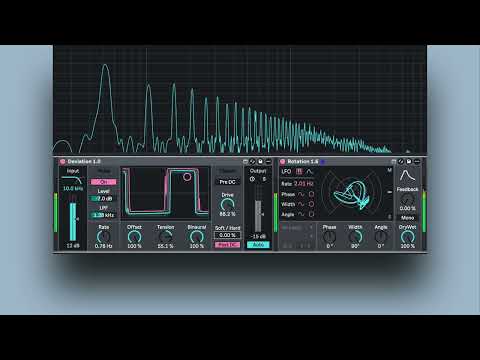
Deviation is an asymmetric waveshaper for Ableton Live that brings PWM to any signal. It stretches your waveform around a movable pivot point, making positive and negative half-cycles unequal and generating even harmonics. Applied independently per channel, the deformation becomes a source of genuine stereo width and motion, straight from the shape of the signal itself.
PWM on any signal, pulse-width modulation brought to any source, not just synth oscillators Asymmetric waveshaping built on a bounded homographic transfer function Per-channel deformation with a Binaural control for stereo width from the asymmetry itself Internal sine LFO modulating the deformation in phase quadrature for continuous stereo motion Dynamic Offset linking DC compensation to the signal envelope Sidechained ring-mod noise injection that fills the dips of the waveform without touching the peaks Soft clipper with Anti-Derivative Anti-Aliasing (ADAA-1) and adjustable knee, from gentle saturation to hard clipping Magnitude-complementary crossover: only the low band is processed, both bands recombine to a flat response Pre and Post DC blocking for symmetric clipping and clean output RMS level matching with Auto-Gain for honest A/B at equal loudness
Start with the Input section: the crossover sends only the low band into the chain, so set the cutoff and push the Input Gain until the level sits close to 0 dB, where Tension's transfer function is calibrated to work best. Then turn up Tension to stretch the waveform and bring in even harmonics. Binaural to spread the deformation across the stereo field. Add shaped Noise to fill the dips of the waveform, then drive the Soft Clipper and dial the Soft/Hard knee to taste, Finally, enable Auto on the output to match the processed level to the input, so you can A/B the effect on and off at equal loudness